The key facts
- In Street View, Google automatically blurs faces and car license plates to protect privacy
- Blurring a house on request is available to the owner or tenant upon confirming the address with a document
- Google does not blur satellite and aerial images itself — restricted zones are coordinated with imagery providers
Why houses and faces are blurred on maps
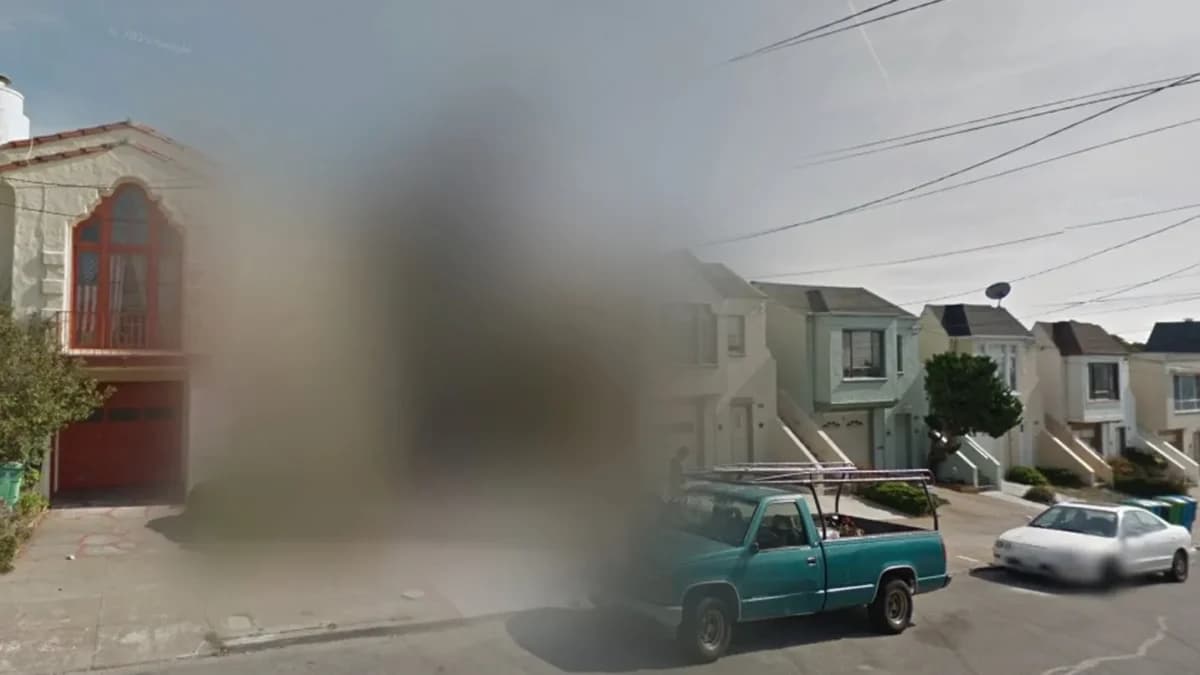
The Street View service lets you 'walk' along streets as if you were standing at the filming location. At the same time, Google automatically blurs people's faces and car license plates: the goal is to make it harder to identify people who happened to be caught in the frame and to protect their privacy. Blurring makes the fine details of a selected part of the image unreadable — a face, a plate, or the appearance of a house. If the automatic system missed a face or a plate, a user can report it to Google. This is reported by Kun.uz.
A blurred house is not always a special facility
An ordinary residential house may also turn out to be blurred on the map: some people do not want strangers examining their home in detail online, and they submit such a request to the company. This is an important clarification for those who see any blurred building on the map as a sign of a secret or guarded facility — according to the publication, some of the blurred houses are the result of requests from the residents themselves.
How satellite imagery differs from Street View
The situation is different with aerial photographs and satellite images. According to official Google information cited by the publication, the company does not blur such images itself. If a government agency asks to hide a certain area, Google responds that the request should be sent to the company — the imagery provider. Therefore, it is wrong to assume that every place hidden from above was manually closed off by Google employees.
How to request blurring of your own house
The owner or tenant of a house can request blurring of its image in Street View. Google requires a document confirming residence at the address or ownership. The procedure is as follows: find your house in Google Maps and open the Street View image; click the 'Report a problem' link in the bottom right corner of the image — this section may also be located in the three-dot menu in the top left corner; mark the house that needs to be blurred on the image and select the 'My home' option; confirm your right to make such a request, enter the address and upload a supporting document; fill in the remaining fields of the form, including your email, pass the reCAPTCHA check and submit the request.
Which document is suitable for confirming the address
To confirm the address, you can use, for example, a utility bill receipt or a rental agreement. Google asks you to keep the address and date in the document but hide the name, account numbers and other personal data. Government identity documents, such as a passport, are not accepted for this purpose.