The key facts
- Hidden chats are protected by a 4-digit PIN code or biometrics (fingerprint, Face ID) and are moved to the Projects > Locked chats section
- The feature does not include end-to-end encryption and does not affect message retention periods
- It is available on all plans, including the free one, in the web version and iOS, Android, macOS and Windows apps; it does not work in Codex and ChatGPT for Healthcare
OpenAI adds secret chats to ChatGPT
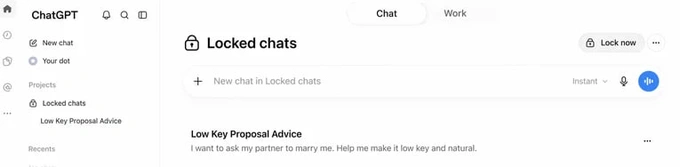
OpenAI announced on its website in the support section that ChatGPT now has a secret chats feature. It allows users to hide chat history, chat content and search results. Access to hidden conversations is granted only after entering a 4-digit PIN code or biometric identification — for example, via fingerprint or Face ID.
How the feature works
Secret mode for a chat can be enabled through the additional options menu (•••). The conversation then moves to the Projects > Locked chats section, and the chatbot prompts the user to set a PIN code. A hidden chat is stored in the account but does not appear in chat history, the list of pinned conversations or suggestions for frequent requests. According to OpenAI, the feature is designed to hide 'sensitive' conversations on shared devices or when showing the screen to another person.
Feature limitations
OpenAI emphasized that hidden chats do not include end-to-end encryption and do not create a separate encrypted storage. The feature does not affect message retention periods and does not hide information saved before the chat was hidden. A share link created before hiding will continue to work, but messages written after the conversation was moved to hidden chats will not be shown to other users. If a user resets the PIN code, all hidden chats and the information stored in the chatbot's 'memory' within them will be permanently deleted.
Availability
The hidden chats feature is available on all ChatGPT plans, including the free one. OpenAI is activating it for users worldwide in stages. It can be used in the web version of the chatbot as well as in the iOS, Android, macOS and Windows apps. However, the feature does not work in Codex or in the medical section ChatGPT for Healthcare.